
Zero fees
If the recipient’s bank charges a fee, we’ll let you know in advance


If the recipient’s bank charges a fee, we’ll let you know in advance

Your transfer arrives in just a few seconds

Send money to Russian bank cards
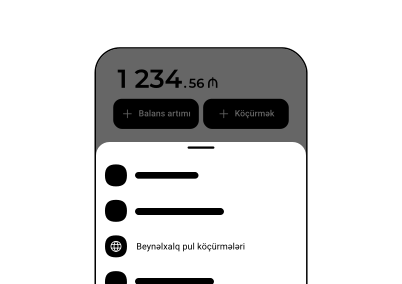
1
On the main screen, tap Transfer → International transfers
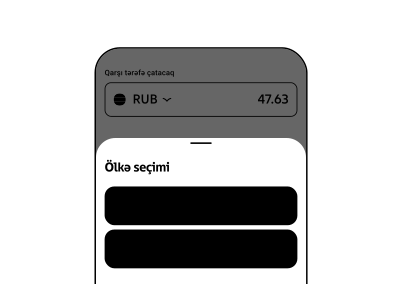
2
Select Transfer to Russia
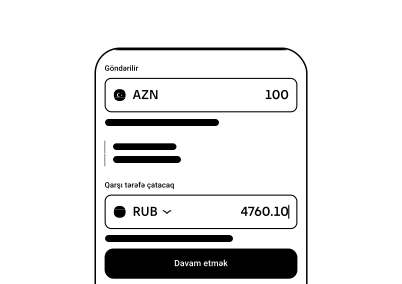
3
Enter the amount
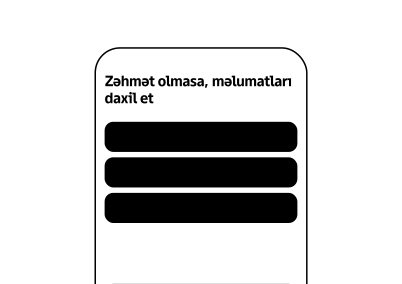
4
Enter the recipient’s card number, name and confirm the transfer
.svg)
Scan this QR code with your phone to download


On average, transfers take about 2 minutes. Processing time may vary depending on the partner and payment system. In rare cases, a transfer may take longer.
m10 does not charge any transfer fees. However, the recipient’s bank may apply a fee according to its own policies.
If a transfer fails, you will see an error message on your screen. This is usually due to transaction limits or incorrect recipient details. Please check the information provided and try again.
Money transfers are available to over 150 countries worldwide. You can find the full list of available destinations at the top of this page.
Yes, the following limits apply:
— Daily limit: up to 3 400 ₼
— Monthly limit: up to 17 000 ₼
— Total limit via other banks and apps: up to 33 000 ₼


Türkiyə

Qazaxıstan

Gürcüstan

Ukrayna

Özbəkistan

Xorvatiya

Britaniya

Polşa

Belarus

Niderland

Yunanıstan

Filippin

Qırğızıstan
A:
Andorra, Antiqua və Barbuda, Anqola, Aruba, Avstraliya, Avstriya
B:
Bəhreyn, Barbados, Belarus, Belçika, Beliz, Benin, Bermud adaları, Boliviya, Bosniya və Herseqovina, Botsvana, Braziliya
C:
Kamboca, Kayman adaları, Kolumbiya, Komor adaları, Kuk adaları, Kosta Rika
Ç:
Çexiya, Çin, Çili
D:
Danimarka, Dominika, Dominikan Respublikası
E:
Ekvador, El Salvador, Estoniya
Ə:
Əlcəzair
F:
Fələstin, Fici, Filippin, Finlandiya, Fransa
G:
Qabon, Qambiya, Qana, Qayana, Qvatemala, Qvineya, Qvineya-Bisau, Qrenada, Gürcüstan
H:
Honduras
X:
Xorvatiya
I:
İslandiya, İsrail, İspaniya, İsveç, İsveçrə
İ:
Hindistan, İndoneziya, İordaniya, İrlandiya, İtaliya
J:
Yamayka
K:
Keniya, Kiribati, Küveyt, Kipr
Q:
Qazaxıstan, Qətər, Qırğızıstan
L:
Latviya, Lesoto, Liberiya, Livan, Lixtenşteyn, Litva, Lüksemburq
M:
Macarıstan, Madaqaskar, Makao, Malavi, Malayziya, Maldiv, Malta, Mavritaniya, Mavriki, Meksika, Moldova, Monqolustan, Monteneqro, Mərakeş
N:
Namibiya, Nepal, Niderland, Niger, Norveç
O:
Oman
Ö:
Özbəkistan
P:
Pakistan, Panama, Papua-Yeni Qvineya, Paraqvay, Peru, Polşa, Portuqaliya
R:
Rumıniya, Ruanda, Rusiya
S:
San-Marino, Samoa, Seneqal, Sent-Kits və Nevis, Sent-Lusiya, Sent-Vinsent və Qrenadinlər, Seyşel adaları, Sinqapur, Slovakiya, Sloveniya, Solomon adaları
Ş:
Şimali Makedoniya, Şri Lanka
T:
Tacikistan, Tanzaniya, Tayland, Tayvan, Toqo, Tonqa, Trinidad və Tobaqo, Türkiyə, Türkmənistan, Törks və Kaykos adaları
U:
Uqanda, Ukrayna, Uruqvay
Ü:
Birləşmiş Ərəb Əmirlikləri
V:
Vanuatu, Vyetnam
Y:
Yeni Zelandiya, Yunanıstan
Z:
Zambiya, Zimbabve






